When managing real estate contracts, mortgage statements, depreciation schedules, and council rate notices, security is non-negotiable. Traditional SaaS financial platforms store millions of customer PDFs and sensitive bank records inside multi-tenant centralized cloud databases, creating high-value targets for ransomware and data breaches.
At BalanceSheet, we engineered our platform on a fundamentally different philosophy: Zero-Persistence Data Ownership.
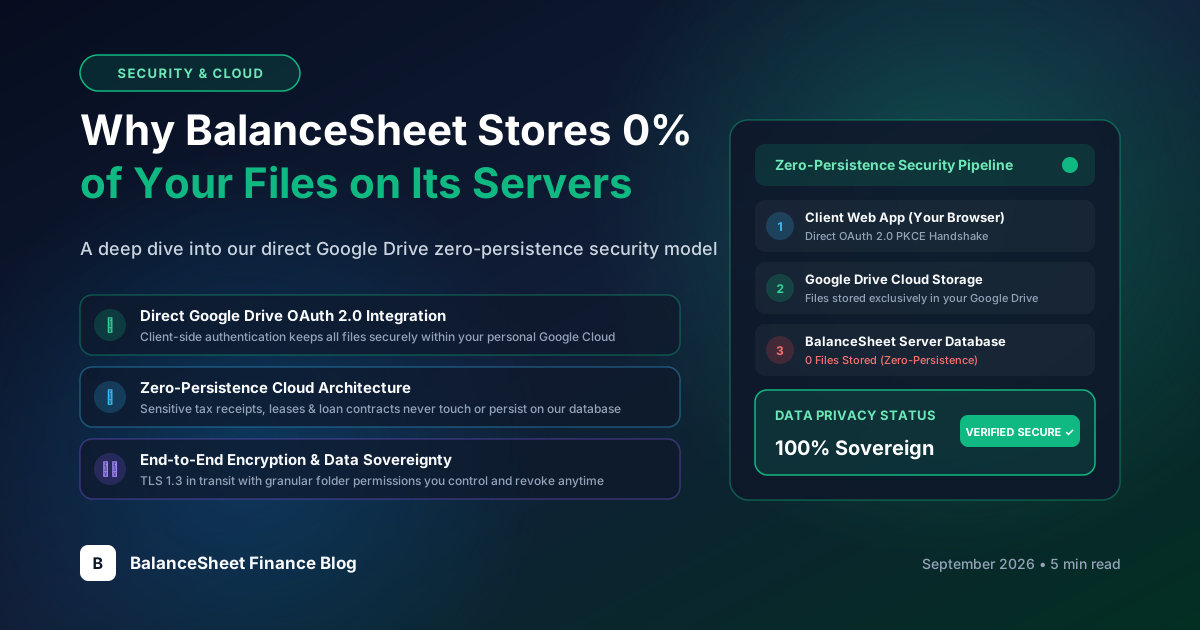
BalanceSheet never stores your property documents, tenancy agreements, or bank invoices in a centralized backend database. All your files remain 100% inside your personal Google Drive account.
#1. The Zero-Trust Security Architecture
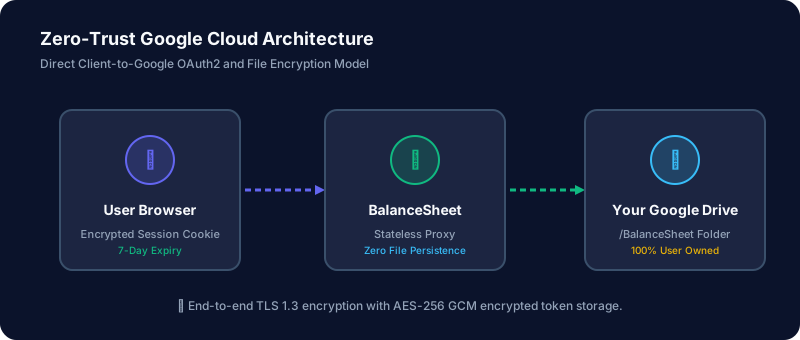
Our platform operates as a secure, authenticated interface between your web browser and the Google Cloud Platform APIs:
#How the Data Flow Works:
- Google OAuth 2.0 Sign-In: You authenticate directly using Google's secure login screen with scoped permissions for Drive and Gmail.
- Encrypted Session Key: Your browser receives an AES-256 encrypted session cookie with strict
HttpOnly,SameSite=Strict, andSecureattributes that auto-expires after 7 days. - Stateless Document Processing: When you upload a water bill or mortgage statement, our backend parses the invoice data in-memory and immediately streams the PDF into your Google Drive
/BalanceSheetfolder. - Instant Memory Reclamation: As soon as the upload response confirms, memory buffers are freed. Nothing lingers on disk.
#2. Key Security Benefits for Australian Property Owners
| Feature | Traditional SaaS Platforms | BalanceSheet Architecture |
|---|---|---|
| Document Storage Location | Third-party shared database | Your private Google Drive (/BalanceSheet) |
| Breach Attack Surface | Multi-tenant honeypot | Isolated, user-controlled cloud storage |
| Data Portability | Trapped in proprietary exports | Open standard PDF files on your Google Drive |
| Account Access Control | App-specific password | Google 2FA / Passkeys / Advanced Protection |
| Data Retention on Cancel | Platform retains backups | You keep all files in your Drive automatically |
#3. Automated Gmail Ingestion with Zero Inbox Spying
Many users receive utility bills, council notices, and strata levies directly via email. BalanceSheet's optional Gmail integration allows you to sync property bills without exposing your entire inbox:
Minimal Permission Scopes: BalanceSheet only accesses emails that you explicitly route or label under the BalanceSheet Gmail folder tag. Your personal correspondence, family emails, and non-property threads are never read or processed.
#4. Conclusion
By delegating document storage to Google's enterprise-grade infrastructure and keeping our backend stateless, BalanceSheet delivers modern portfolio intelligence with uncompromising data sovereignity.